Which LLM Should I Use?
The honest answer is: it depends on the task, and it changes every few months. Here is how to think about the tradeoffs.
Everything here has a shelf life.
Models improve on the timescale of weeks. A platform that was clearly behind three months ago can pull ahead with a single release. Benchmarks shift, pricing changes, new features appear, old ones get deprecated. Any ranking you read (including this one) is a snapshot, not a verdict.
The practical implication: do not optimise for the best model. Optimise for the right model for the task you are doing today. Most researchers end up using two or three platforms depending on the job.
Last updated: April 2026.
The big three
The three leading platforms right now are ChatGPT, Claude, and Gemini. Each one offers a few models at varying levels of capability, and the names can be confusing at first.
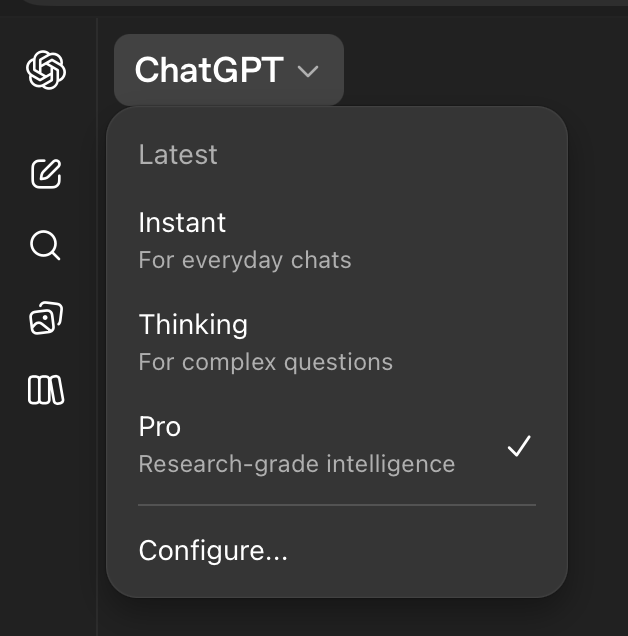
ChatGPT is made by OpenAI. The current version is GPT-5.4, and it comes with a few modes. Instant is the fast option for everyday questions, but will fail on more complex tasks. Thinking spends more time reasoning before it responds, but Pro is the strongest (and slowest), for when you want a careful answer and do not mind waiting.
Claude is made by Anthropic and available at claude.ai. It also has tiers: Haiku is fast and light, Sonnet is the middle tier, and Opus is the most capable for hard reasoning.
Gemini is Google's model. Fast is the fastest (wow!), Thinking handles harder work, and Pro is their heavy reasoning mode for research.
The three above are what you type into in a browser tab. Two related tools use the same underlying models but run inside your code editor: Claude Code (Anthropic) and Codex CLI (OpenAI). They read and write files, run commands, and work across a whole project instead of a single chat. The rest of this guide motivates why researchers move from the browser to those agentic tools. The pricing section below covers both.
Pricing
How much does this cost?
AI companies limit how much you can use their models. For Claude, Anthropic resets your usage every five hours and may also impose weekly caps depending on your plan. Any questions you ask Claude through the browser (at claude.ai) count toward the same limit as Claude Code.
For Codex, OpenAI uses a similar five-hour window with a weekly limit, but separates ChatGPT usage from Codex usage. If you pay for a ChatGPT subscription (or get ChatGPT Edu for free through Harvard), you get a budget for ChatGPT and a separate budget for Codex.
What gets tracked is the text you send in (input tokens), the text the model sends back (output tokens), and the intermediate reasoning the model does (thinking tokens). If you use the API directly, you pay as you go. If you have a subscription, you work inside your plan's limits. You can check your current session cost by typing /cost in Claude Code.
You can make your budget last longer by alternating between Claude and Codex, or by using lighter models like Sonnet for tasks that do not need heavy reasoning. Thinking modes burn through tokens much faster than quick-response modes.
Claude subscriptions right now
- Claude Pro: $20/month.
- Claude Max 5x: $100/month. 5x Pro capacity.
- Claude Max 20x: $200/month. 20x Pro capacity.
Codex and ChatGPT plans right now
- ChatGPT Plus: $20/month. Includes Codex.
- ChatGPT Pro: $200/month. Includes Codex with much higher limits.
- ChatGPT Edu: Free through Harvard. Includes Codex with limits comparable to the $20/month plan.
You can check your current usage and remaining limits in the account settings of each platform. For Claude, go to claude.ai/settings/usage. For ChatGPT and Codex, go to chatgpt.com/codex/settings/usage.
Secondary commercial models
Grok (xAI)
Now at version 4.2 (public beta). Grok has real-time access to X (formerly Twitter) data, built-in web search, code execution, and document search. Grok 4.1 Fast has a 2-million-token context window (the largest of any frontier model) and is one of the cheapest API options at $0.20 per million input tokens. Less filtered than the big three: it will attempt tasks that ChatGPT and Claude refuse, which is both a strength and a risk.
For research, Grok is interesting for real-time social media analysis and public discourse. The 2M context window is also useful for very large document ingestion. For most other tasks, the big three are more capable.
Perplexity
Not exactly an LLM. More of an AI-powered search engine. You ask a question, it searches the web, reads the results, and gives you a cited summary. Very good for quick factual lookups with references you can verify. Fast, accurate on well-documented topics, and free for basic use. Think of it as a complement to a full LLM, not a replacement.
Microsoft Copilot
GPT models wrapped in the Microsoft ecosystem. If your lab runs on Microsoft 365, Copilot integrates directly into Word, Excel, PowerPoint, and Teams. The in-app integration (summarise this spreadsheet, draft this email, turn these notes into slides) is where it shines. The standalone chat is less capable than ChatGPT Pro.
Open-source models
Open-source LLMs are models whose weights are publicly available: you download them, run them on your own hardware, and no data ever leaves your machine. This matters for work involving sensitive data and for reproducibility. The gap between open-source and commercial has narrowed dramatically in 2025–2026.
Leading families
- Llama (Meta). The most widely used open-source family. Llama 3 comes in sizes from 8B to 405B parameters. Smaller models run on a good consumer GPU; larger ones compete with commercial models on many benchmarks.
- Kimi K2 / K2.5 (Moonshot AI). A mixture-of-experts model: 1 trillion total parameters, 32 billion active. K2.5 adds native multimodal and agentic capabilities. Open weights under a modified MIT license. Competitive with closed models on reasoning and coding benchmarks; often cited alongside DeepSeek as evidence that open-source is closing the gap.
- DeepSeek. DeepSeek-V3 and DeepSeek-R1 are very competitive on math, code, and reasoning, often matching GPT-4-class performance. The tradeoff: controversial data practices and potential compliance concerns for some institutions.
- Mistral. French company. Strong at multilingual tasks and code. Mistral Large is competitive with Claude Sonnet on many benchmarks. Mixtral (mixture-of-experts) offers a good quality-to-cost ratio.
- Qwen (Alibaba). Strong multilingual coverage, competitive benchmarks, large model zoo. Increasingly adopted in computational research.
The honest tradeoff
Open-source models at 70B+ parameters are genuinely competitive with commercial models on many tasks. But they require significant hardware, either a workstation with a high-end GPU or rented cloud compute. For most researchers, the monthly cost of renting enough GPU exceeds the $20/month subscription to a commercial platform.
Open-source wins clearly in three scenarios:
- Sensitive data. If your data cannot leave your institutional network (HIPAA, embargoed results, classified material), a local model is the only option.
- Fine-tuning. If you need to train the model on your specific domain data, open-source lets you do that. Commercial models do not.
- Reproducibility. If you need to guarantee the exact same model produces the exact same output six months from now, you need to pin the weights. Commercial APIs can change the model behind the endpoint without notice.
Practical advice
- Start with free tiers of all three big platforms. ChatGPT, Claude, and Gemini all offer enough free usage to form an opinion. Give each one the same hard question from your research and compare the answers.
- For agentic work (Claude Code, Codex CLI, skills, MCP servers): Claude and ChatGPT are the leaders. Gemini CLI is catching up.
- If your data is sensitive: talk to your IT department about institutional agreements before uploading anything. When in doubt, use an open-source model running locally.
- Check back every 2–3 months. The ranking shuffles. A model that struggled with your use case in January may handle it well by April.