Your First Project
Let's give Claude a way to remember things.
First, the simplest case. You want it so that every time you open a new Claude session (the same way you would start a new conversation in your browser), it pre-loads in the exact same introduction. Something like:
"You are a helpful research assistant. You are working on a project about X. The main files in this project are ... When I ask you to do something, follow these formatting rules..."
There is a built-in mechanism for this. Every time you start a Claude session, it automatically reads a file called CLAUDE.md.
CLAUDE.md is a markdown file that lives in the folder you are working in. Because it sits right next to your project files, the instructions stay attached to the project itself. Every new Claude session reads it on startup, so you never have to repeat your project context, formatting rules, or role-setting instructions again. This is the main way Claude remembers things between sessions.
You can also have a global CLAUDE.md at ~/.claude/CLAUDE.md that applies to every project on your machine. Claude reads the global one first, then the project-level one, so project-specific instructions can override global defaults. If you have preferences that should follow you everywhere (your name, your writing style, general rules), put them in the global file. If the instructions only matter for one project, keep them in that project's folder.
In Codex, the equivalent file is called AGENTS.md. It works the same way: Codex reads it on startup to understand how to work in that folder.
Setup
Create a CLAUDE.md file.
There are two ways to do this. The simplest is to create a new file in VS Code, name it CLAUDE.md, and start typing the instructions you want every new Claude to inherit.
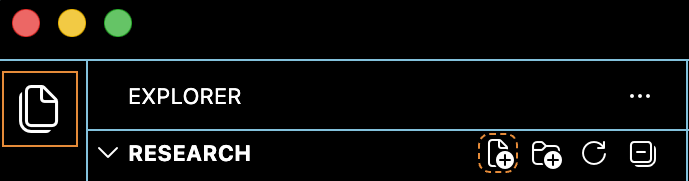
The other option is to let Claude do the setup for you. Open the Claude Code panel in VS Code and type:
/init
Claude will look at your project's structure, read the files, and draft a starting CLAUDE.md based on what it finds. You can always edit the file afterward.
There are many built-in commands like /init that you can call with a slash. We will talk more about reusable skills and agents below.
Context
How much can Claude remember at once?
Even with CLAUDE.md, there is still a limit on how much an LLM can hold in a single session. That working memory includes everything: your messages, Claude's replies, any file contents it reads, and the intermediate reasoning it does behind the scenes.

If the usage indicator is not showing up for you yet, that usually means you are still at a low enough percentage that there is nothing to worry about.
When the context does fill up, Claude will read through the conversation, summarize what has happened, and condense everything down so the session can continue. This process is called compacting. You can also trigger it yourself at any time by typing /compact.
CLAUDE.md, so it will never lose the project-level instructions you put there.
Use fresh sessions instead of one endless conversation.
Rather than using one conversation that keeps compacting over and over, open a fresh Claude for each task. Shorter sessions are cleaner, easier to review, and less likely to drift off track. Each session should be focused on one thing.
But this raises a question: if each session starts from scratch, how do they stay coordinated? CLAUDE.md carries your project instructions, but it does not track which tasks are done, which are in progress, and what still needs to happen. For that, we need agents and planning files.
Agents
Spawning Claude instances for specific tasks.
Say you are writing a paper and want Claude to act as a reviewer. You could ask directly: "Look at paper.tex and act as a reviewer. Be fair but try your best to find areas which I did not explain correctly or subtleties that I missed." Claude will do this, and the feedback is often useful on the first try.
But then you read the review and something feels off. Maybe it was too nitpicky, or it glossed over the part you actually needed help with. So you tell it: "When you give feedback, use this particular pedagogical style. Explain topics related to X more slowly. Do not nitpick on Y since we are assuming Z." The feedback improves.
The problem is that the next time you want a review, you have to say all of that again. The fix is to create an agent: a reusable file that encodes all your preferences for a specific task. You set it up once, and from then on, every new Claude you tell "run the reviewer agent" already knows exactly how you want feedback.
How to create an agent.
The easiest way to create an agent is to ask Claude to make one for you. Describe what the agent should do, what style it should use, what it should focus on and what it should ignore. Claude will create a markdown file with all of those instructions baked in. The more specific you are about what you liked and disliked in past interactions, the better the agent will be.
Create a reusable reviewer agent for this project. It should read paper.tex, act like a fair but rigorous referee, and focus on unclear explanations, missed subtleties, and places where the argument is not yet convincing. Use a nice and slow pedagogical style when giving feedback, explain topics related to X more slowly, and do not nitpick on Y because we are assuming Z. Save the agent so I can later invoke it with a short command like "run the reviewer agent on paper.tex".
The agent file itself is just a markdown document that contains the agent's instructions, personality, and any rules you have set. Think of it as a CLAUDE.md that only applies when you run that specific agent. You can open it, read it, and edit it by hand any time.
After creating it, all you have to do in the future is:
"Run the reviewer agent on your_paper.tex."
Where agents live.
When you create an agent, it gets written to a file inside .claude/agents/ in your project folder. That means the agent is only available when you open that folder. If you want an agent accessible from any project on your machine, save it in ~/.claude/agents/ instead (the global location).
Agents can also update their own memory as you work with them. They will sometimes do this automatically when they notice a pattern in what you ask for, but you can also tell Claude to update the agent file directly.
~/.claude/.
Coordination
Track the project, not just individual tasks.
You want Claude to keep a running list of what has been done and what still needs to happen. Even for a small task, have it break the work into steps so that if the session ends or the internet drops, the next Claude instance knows exactly where the previous one left off.
Setting this up is easy: you just ask Claude to create the plan. But how do you make sure it always does this, even as a brand new instance? Put the instruction in CLAUDE.md. That file gets read by every session automatically.
Do task X. First, create a plan, breaking the work into atomic steps, and save it to plan.md. As you complete the tasks, mark off which tasks are completed and which remain to be done. Add a line to CLAUDE.md so that new instances know to orient themselves by looking at plan.md.
As your workflow gets more complicated, you will start to clutter the folder with planning files. The solution is version control: each task lives in its own isolated branch (a parallel copy of your project), so the planning documents for one job do not interfere with another.
Delegation is the whole point.
You now have an agentic workflow instead of one bloated chat. You can delegate bounded tasks to agents that have their own context and instructions, and your main conversation does not have to carry the extra weight.
You can also spawn temporary subagents on the fly for one-off tasks. Say you are in the middle of writing and want to check whether a specific claim in your introduction is supported by the data in your appendix. Instead of breaking your flow, just tell Claude to spawn a subagent to check it. The subagent runs in the background, comes back with an answer, and your main session stays focused. These temporary agents are not saved unless you explicitly ask, so they do not pile up.